
Basic Equipment for Podcast: Essential Gear Guide 2026

Starting a podcast in 2026 has never been more accessible, but choosing the right basic equipment for podcast production can feel overwhelming with countless options available. Whether you're launching a solo show, planning interviews, or building a business-focused series, understanding the fundamental gear requirements ensures you invest wisely from day one. This comprehensive guide breaks down each essential component, helping you build a reliable setup that delivers professional sound quality without unnecessary complexity or expense.
Understanding Your Core Podcast Recording Setup
The basic equipment for podcast production centers on four fundamental categories: audio capture, monitoring, processing, and recording. Each component serves a specific purpose in transforming your voice into broadcast-ready content.
Microphones: Your Primary Audio Source
Your microphone represents the most critical investment in your podcasting journey. Two primary types dominate the market, each with distinct advantages for different recording environments.
Dynamic microphones excel in untreated spaces because they reject background noise naturally. These microphones require closer positioning (typically 2-4 inches from your mouth) and work exceptionally well for podcasters recording in home offices or shared spaces. The cardioid pickup pattern captures sound primarily from the front while minimizing ambient noise from sides and rear.
Condenser microphones offer superior sensitivity and capture vocal nuances with exceptional clarity. However, they pick up everything in your environment, making them better suited for acoustically treated spaces. Many podcasters starting with essential podcast equipment choose dynamic microphones for their forgiving nature and consistent performance.
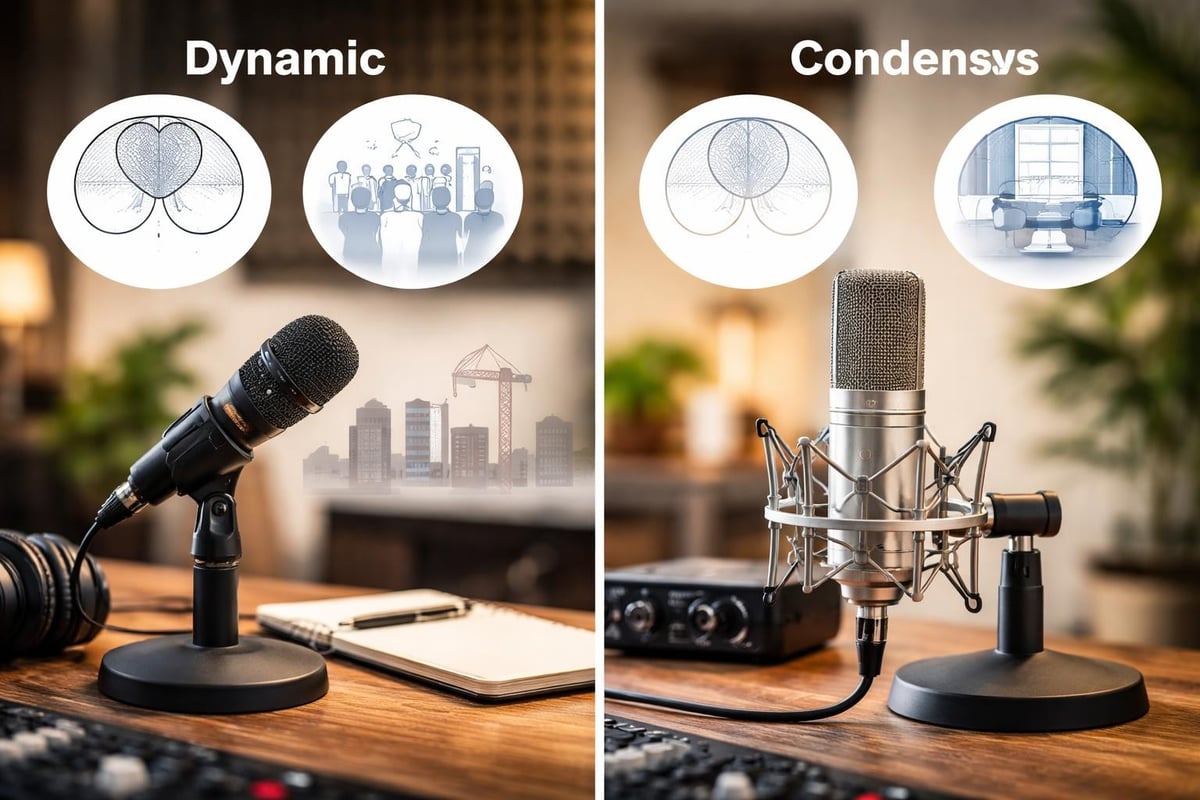
Connection options matter significantly. USB microphones plug directly into computers, offering simplicity for solo podcasters. XLR microphones require audio interfaces but provide superior sound quality and flexibility for multi-host setups. The podcast equipment guide at Dispatch.fm outlines various microphone tiers to match your budget and quality expectations.
| Microphone Type | Best For | Connection | Price Range |
|---|---|---|---|
| USB Dynamic | Solo podcasters, beginners | Direct to computer | $60-$200 |
| XLR Dynamic | Multi-host, professional quality | Audio interface required | $100-$400 |
| USB Condenser | Treated spaces, vocal detail | Direct to computer | $80-$250 |
| XLR Condenser | Studio environments, maximum quality | Audio interface required | $150-$600 |
Audio Interfaces: The Bridge Between Microphone and Computer
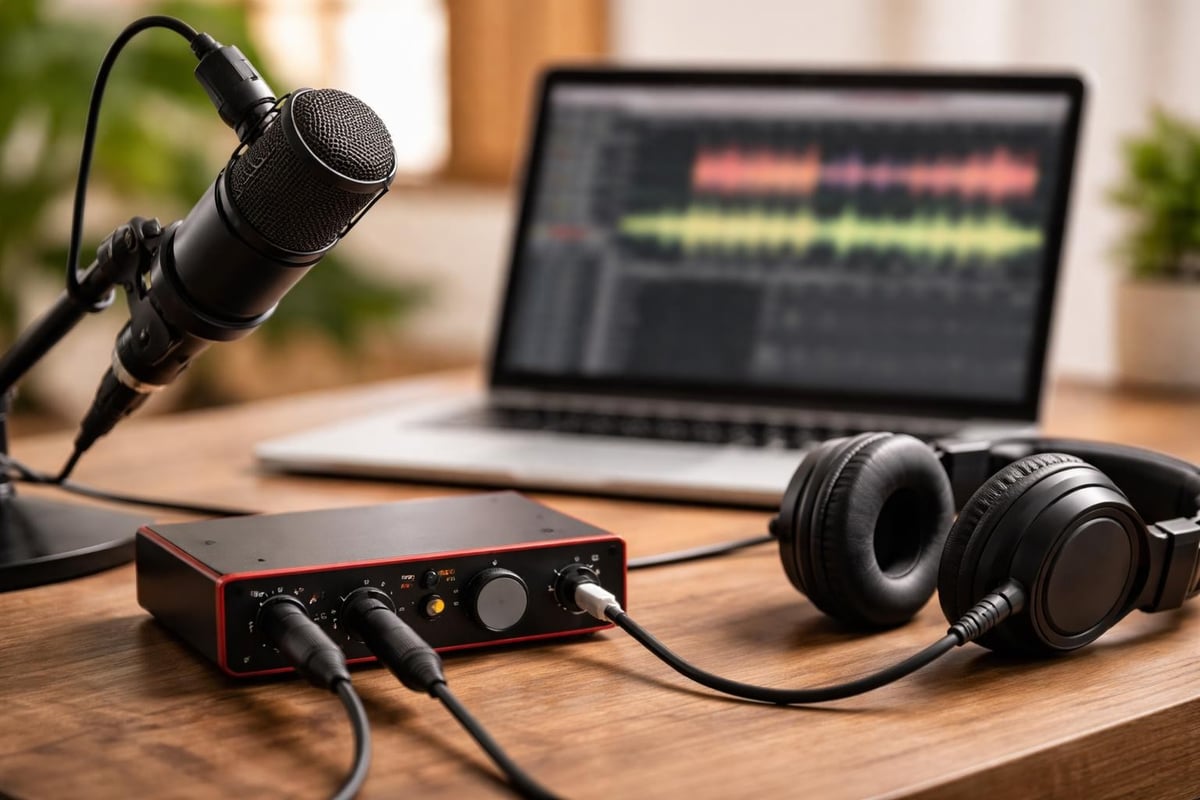
Audio interfaces convert analog signals from XLR microphones into digital data your computer processes. This equipment becomes essential when scaling beyond a single USB microphone or when you need superior audio quality.
Key features to consider:
- Number of XLR inputs (matching your host count plus one for guests)
- Phantom power availability for condenser microphones
- Preamp quality affecting overall sound clarity
- Direct monitoring capability for zero-latency playback
- USB connectivity for computer compatibility
Most podcasters starting with basic equipment for podcast production choose two-channel interfaces, providing flexibility for solo recording or one-on-one interviews. Four-channel interfaces accommodate panel discussions or complex recording scenarios. The comprehensive equipment overview from Nearstream explains how interfaces integrate into various podcast formats.
Modern interfaces also serve as headphone amplifiers, distributing audio to multiple listeners during recording sessions. This functionality proves invaluable when recording with guests or co-hosts who need real-time monitoring.
Monitoring Equipment and Acoustic Treatment
Professional Headphones for Accurate Monitoring
Closed-back headphones represent the industry standard for podcast monitoring because they prevent audio leakback into microphones. This isolation ensures clean recordings without feedback or echo issues.
Essential headphone characteristics:
- Flat frequency response for accurate sound reproduction
- Comfortable padding for extended recording sessions
- Adequate cable length for movement flexibility
- Durable construction withstanding regular use
Studio headphones differ from consumer models by prioritizing accuracy over enhanced bass or treble. When evaluating equipment needed for a podcast, remember that monitoring quality directly impacts your ability to catch technical issues during recording rather than discovering them in post-production.
Budget allocation should prioritize microphones first, then headphones. However, investing in quality monitoring equipment prevents costly mistakes and reduces editing time significantly.
Acoustic Treatment Basics
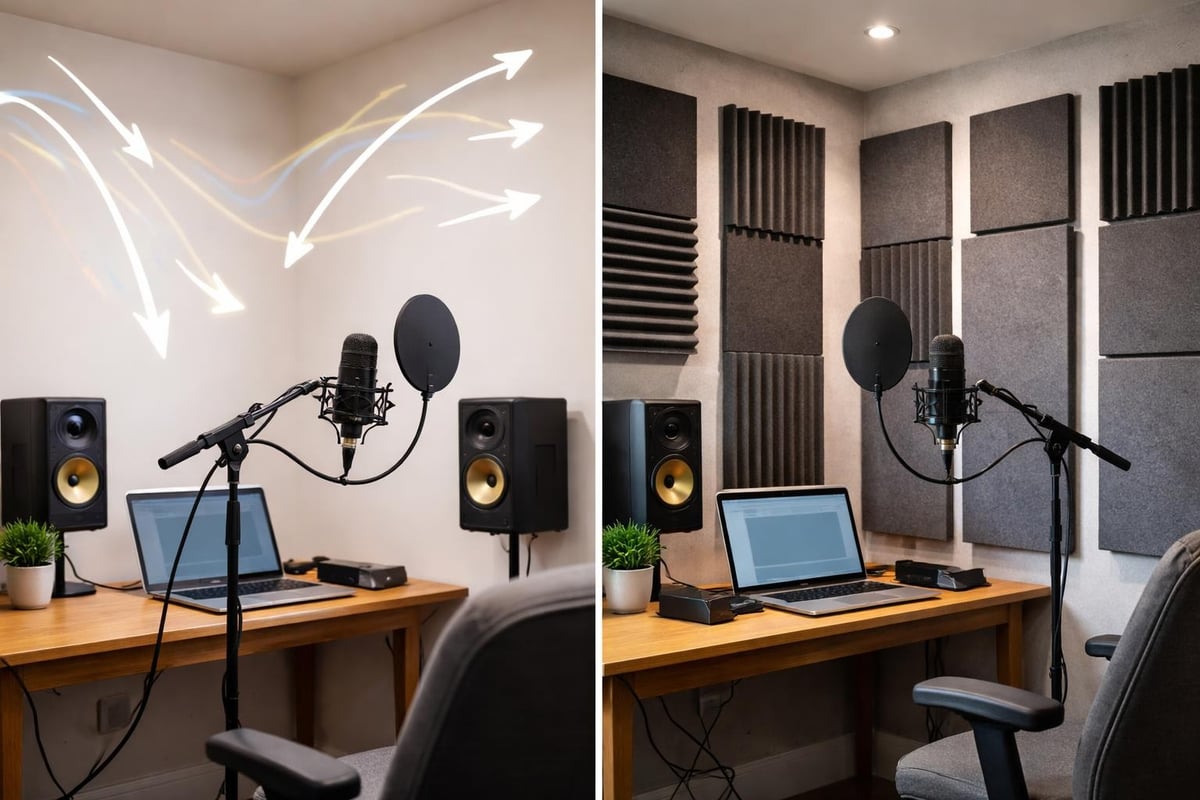
While not traditionally considered recording equipment, basic acoustic treatment dramatically improves audio quality. Even modest improvements reduce echo, reverberation, and unwanted reflections that plague amateur recordings.
Simple acoustic solutions include:
- Foam panels on walls behind and beside microphones
- Bass traps in room corners to control low-frequency buildup
- Portable reflection filters attached to microphone stands
- Heavy curtains or blankets to dampen reflections
- Carpets or rugs to reduce floor bounce
Many podcasters overlook acoustic treatment when assembling their basic equipment for podcast production, then struggle with hollow or echoey sound quality. The Domestika podcasting tutorial emphasizes proper room preparation as crucial as equipment selection itself.
Recording Software and Digital Audio Workstations
Choosing Your Recording Platform
Digital Audio Workstations (DAWs) capture, edit, and produce your podcast episodes. Options range from free beginner-friendly software to professional-grade platforms used in commercial studios.
Popular DAW options for podcasters:
- Audacity offers completely free, open-source recording and editing with all essential features for basic podcast production
- GarageBand provides intuitive Apple ecosystem integration at no cost for Mac users
- Adobe Audition delivers professional capabilities with subscription pricing
- Reaper combines affordability with extensive functionality and customization
- Logic Pro serves Mac users seeking advanced features with one-time purchase pricing
When selecting recording software as part of your basic equipment for podcast setup, consider your technical comfort level, operating system, and future scalability needs. The best program for podcast recording depends heavily on your specific workflow and production complexity.
Most professional podcast production services, including video-first production approaches, use industry-standard software capable of handling multi-track recording and advanced processing.
Essential Software Features
Your DAW should support multi-track recording for simultaneous capture of multiple microphones. This capability proves essential for interviews, panel discussions, or any scenario involving multiple speakers.
Look for built-in effects processing including:
- Noise reduction to eliminate background hum or ambient sound
- Compression to balance volume levels throughout episodes
- Equalization for enhancing vocal clarity and warmth
- De-esser to reduce harsh sibilance in speech
- Normalization for consistent loudness across episodes
Remote recording capabilities have become increasingly important since 2020. Many podcasters now incorporate virtual guests, requiring software that integrates with video conferencing platforms or dedicated remote recording services.
Accessories That Complete Your Setup
Boom Arms and Microphone Stands
Proper microphone positioning significantly impacts audio quality. Boom arms attach to desks, positioning microphones at optimal height and distance while keeping desk space clear. They also reduce handling noise and vibrations that compromise recording quality.
Boom arm advantages:
- Adjustable positioning for comfort and optimal sound capture
- Space-saving design compared to traditional stands
- Reduced desk clutter improving workflow
- Shock mounting that isolates microphones from vibrations
- Cable management systems for cleaner appearance
Floor stands work better for standing presentations or video podcasts where desk-mounted equipment appears in frame. The RSS.com equipment guide discusses positioning strategies for various podcast formats and recording scenarios.
Pop Filters and Windscreens
These inexpensive accessories prevent plosive sounds (hard "p" and "b" consonants) from overwhelming your microphone. Pop filters use mesh screens positioned between speaker and microphone, while foam windscreens slip directly onto microphone capsules.
Professional podcasters typically use pop filters with large-diaphragm condenser microphones and foam windscreens with dynamic microphones. Both solutions cost minimal amounts yet dramatically improve vocal clarity and reduce editing requirements.
Cables and Adapters
Quality cables matter more than many beginners realize. Cheap cables introduce noise, fail unexpectedly, or cause intermittent connection issues that disrupt recording sessions.
| Cable Type | Purpose | Recommended Length |
|---|---|---|
| XLR | Microphone to interface | 10-15 feet |
| USB | Interface to computer | 6-10 feet |
| Headphone extension | Monitoring flexibility | 10-15 feet |
| Adapter cables | Compatibility solutions | As needed |
Purchase cables with proper shielding and robust connectors. These investments prevent technical problems during critical recording moments when guests or co-hosts rely on your professionalism.
Budget Considerations and Scaling Your Setup
Entry-Level Investment Strategy
Starting with basic equipment for podcast production doesn't require thousands of dollars. A functional setup capturing broadcast-quality audio begins around $200-400 total investment.
Minimal viable podcast equipment:
- USB dynamic microphone ($80-150)
- Closed-back studio headphones ($50-100)
- Free recording software ($0)
- Pop filter or windscreen ($10-20)
- Basic boom arm ($30-60)
This configuration serves solo podcasters focusing on content quality rather than production complexity. As your show grows and monetization begins, strategic upgrades improve quality incrementally without requiring complete equipment replacement.
The SONE App budget guide breaks down equipment recommendations across starter, enthusiast, and professional tiers, helping you plan long-term investments strategically.
Scaling to Multi-Host Configurations
Adding co-hosts or regular guests requires multiplicative equipment expansion. Each additional person needs dedicated microphones and headphones for optimal recording quality.
Multi-host equipment additions:
- Audio interface with sufficient inputs (2-4 channels)
- Additional XLR microphones matching your primary choice
- Headphone splitter or interface with multiple outputs
- Extra boom arms or stands for positioning flexibility
- Extended cables reaching all recording positions
Many podcasters underestimate the complexity of multi-person recording. Setting up a podcast studio for multiple hosts requires careful planning around room layout, cable management, and acoustic treatment to prevent crosstalk between microphones.
Video Podcast Equipment Expansion
Video podcasting has exploded in popularity, particularly on YouTube where visual engagement drives discovery and retention. Adding video to your podcast requires additional equipment beyond basic audio gear.
Essential video additions:
- Webcam or mirrorless camera with clean HDMI output
- Appropriate lighting (key light, fill light, background light)
- Video capture device or camera interface
- Background setup or green screen
- Additional computer processing power for simultaneous audio/video capture
The video podcast equipment guide from Podcast Monkey details how to build video capabilities onto existing audio foundations. Video production significantly increases complexity, making professional video podcast editing services attractive for creators prioritizing content over technical execution.
Maintenance and Equipment Longevity
Protecting Your Investment
Basic equipment for podcast production requires minimal maintenance but benefits from protective care. Microphones are particularly sensitive to moisture, physical impact, and dust accumulation.
Equipment care best practices:
- Store microphones in protective cases when not in use
- Keep equipment away from liquids and food during recording
- Clean headphone pads regularly with appropriate solutions
- Inspect cables for wear and replace before failure
- Update software and firmware maintaining optimal performance
- Calibrate audio levels preventing unnecessary stress on preamps
Professional podcasters treat equipment as business assets requiring protection and maintenance. This mindset extends equipment lifespan and prevents unexpected failures during important recording sessions.
Troubleshooting Common Issues
Understanding basic troubleshooting saves time and frustration when technical problems arise. Most podcast equipment issues trace to connection problems, gain staging errors, or software conflicts.
| Issue | Common Causes | Solutions |
|---|---|---|
| No audio signal | Disconnected cables, wrong input selected | Check all connections, verify software settings |
| Background hum | Ground loop, electrical interference | Use powered USB hub, try different outlets |
| Distorted audio | Gain set too high, overdriven preamps | Lower input levels, increase distance from mic |
| Echo or reverb | Untreated room acoustics | Add acoustic treatment, reduce monitoring volume |
| Latency | Buffer settings, computer performance | Adjust buffer size, close background applications |
The How This Works podcast equipment guide includes troubleshooting sections addressing problems specific to various equipment configurations and recording scenarios.
Software Integration and Workflow Optimization
Streamlining Your Production Process
Efficient workflows separate amateur podcasters from professionals producing consistent content. Your basic equipment for podcast recording integrates with broader production systems including editing, hosting, and distribution.
Workflow considerations:
- File naming conventions for easy episode organization
- Backup systems protecting against data loss
- Template projects with standard effects and settings
- Keyboard shortcuts reducing repetitive task time
- Integration between recording and editing software
Many podcasters discover that equipment represents just one component of successful production. Time investment in learning software, developing efficient workflows, and mastering audio fundamentals often yields greater quality improvements than expensive equipment upgrades.
Professional services like podcast editing companies handle post-production complexity, allowing creators to focus exclusively on content development and guest booking rather than technical execution.
Remote Recording Considerations
The shift toward remote podcasting has transformed equipment requirements. Cloud-based recording platforms now capture separate audio tracks from distributed participants, but local recording quality still determines final output.
Remote recording essentials:
- Reliable internet connection with sufficient upload bandwidth
- Quality microphone and interface at each location
- Headphones preventing audio feedback during recording
- Backup recording systems capturing local copies
- Communication platform for technical coordination
Remote setups multiply potential failure points. The OBSBOT beginner equipment guide addresses remote recording challenges and recommends equipment configurations that maintain quality across distributed recording scenarios.
Professional Services and DIY Balance
When to Outsource Technical Aspects
Many successful podcasters recognize their strengths lie in content creation, hosting, and audience building rather than audio engineering. This realization leads to partnerships with production services handling technical execution.
Benefits of professional production support:
- Consistent audio quality across all episodes
- Time savings redirected toward content and marketing
- Access to advanced processing and editing techniques
- Reduced technical stress and troubleshooting burden
- Professional guidance on equipment upgrades and setup optimization
Services specializing in post-production podcast work transform basic recordings into polished episodes competitive with major network productions. This approach allows creators with basic equipment for podcast recording to achieve professional results without mastering complex audio engineering skills.
Building Your Technical Knowledge
Even when outsourcing production, understanding fundamental audio concepts improves recording quality and collaboration with technical partners. Knowledge of proper microphone technique, gain staging, and room acoustics enables better source recordings that editors can enhance rather than repair.
Invest time learning your equipment thoroughly. Read manuals, watch tutorials, and experiment with settings during non-critical recording sessions. This foundation prevents technical problems during important interviews or time-sensitive content capture.
The podcast strategy guide from Podcast Monkey emphasizes how technical competence supports broader content strategy and audience growth objectives. Technical quality forms the foundation upon which compelling content builds audience loyalty and engagement.
Selecting and mastering basic equipment for podcast production establishes the technical foundation for your show's success, but many creators find their time better spent on content development and audience building rather than audio engineering. Podcast Monkey specializes in transforming raw recordings into polished, professional episodes ready for YouTube, podcast platforms, and social media, handling everything from audio editing to video optimization and content repurposing. Our comprehensive production services let you focus on what you do best while we ensure your podcast sounds and looks exceptional across all distribution channels.
About Podcast Monkey
Podcast Monkey is a video-first podcast production agency that handles strategy, recording support, editing, YouTube optimization, and repurposed clips for B2B brands. We specialize in turning raw podcast recordings into polished episodes and social content ready for YouTube, podcast platforms, and social media.
To get help with your show, book a free personalized podcast strategy consultation here: https://calendly.com/d/crd7-h33-vmq/personalized-podcast-strategy-consultation