
Essential Equipments Needed for a Podcast in 2026

Launching a podcast in 2026 requires more than just a great idea and compelling content. The equipments needed for a podcast have evolved significantly, especially as video podcasting continues to dominate platforms like YouTube and Spotify. Whether you're planning a solo show or interviewing industry leaders, understanding the essential gear will help you deliver professional-quality content that resonates with your audience. This comprehensive guide breaks down everything you need to know about podcast equipment, from basic necessities to professional-grade tools that can elevate your production value.
Core Audio Equipment
Microphones: Your Most Critical Investment
The microphone stands as the foundation of the equipments needed for a podcast. Your voice is the primary content delivery mechanism, making audio quality non-negotiable for listener retention and growth.
USB microphones offer the simplest entry point for beginners. These plug-and-play devices connect directly to your computer without requiring additional hardware. Popular options include the Audio-Technica ATR2100x-USB and Blue Yeti, which provide excellent sound quality for podcasters working from home offices or shared spaces. USB microphones typically range from $60 to $250 and work well for solo podcasters or those conducting remote interviews.
XLR microphones represent the professional standard. These require an audio interface but deliver superior sound quality and greater control over your audio signal. The Shure SM7B has become the industry benchmark, though dynamic microphones like the Electrovoice RE20 or Shure SM58 also deliver exceptional results. XLR setups provide flexibility for growth, allowing you to add multiple microphones for co-hosts or in-person guests.
When selecting podcast equipment, consider your recording environment. Dynamic microphones excel at rejecting background noise, making them ideal for untreated spaces. Condenser microphones capture more detail but also pick up room echo and ambient sounds.
Audio Interfaces and Mixers
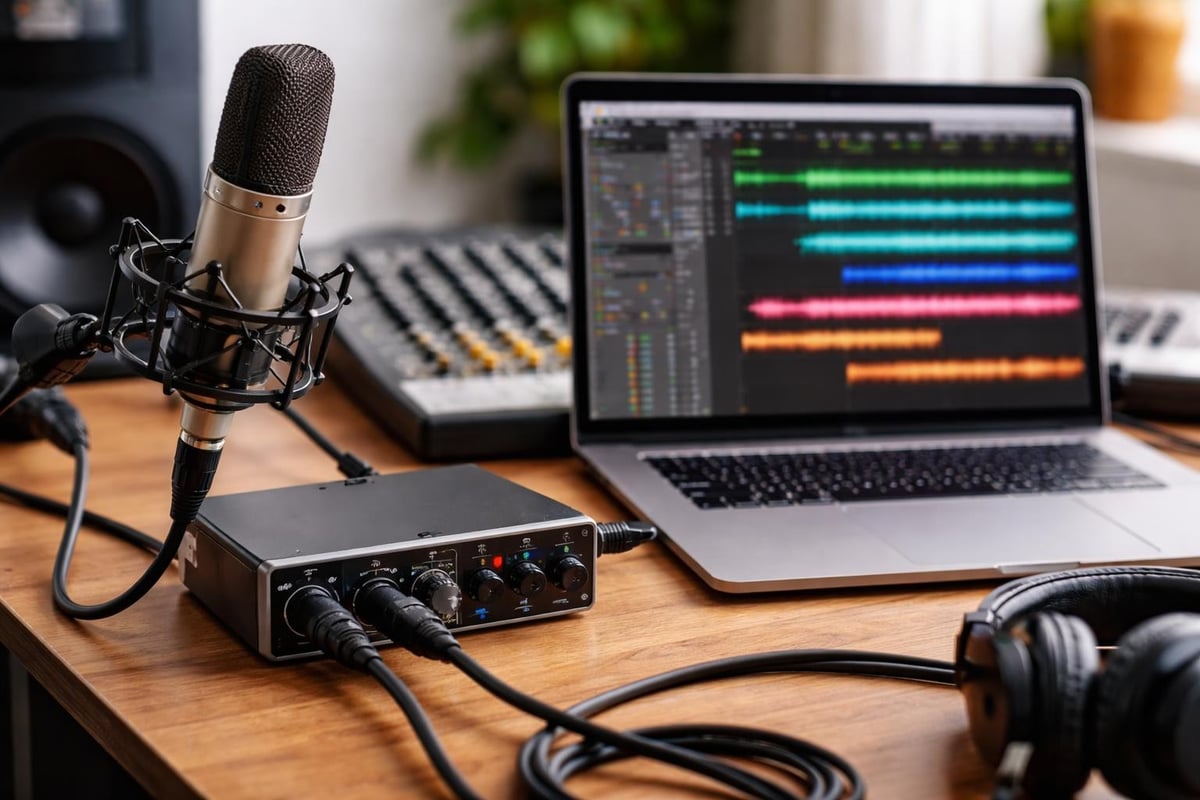
An audio interface serves as the bridge between XLR microphones and your computer. These devices convert analog audio signals to digital format while providing phantom power for condenser microphones.
- Focusrite Scarlett series: Industry-standard interfaces with exceptional preamps
- PreSonus AudioBox: Budget-friendly option with reliable performance
- Universal Audio Apollo: Premium choice for professional studios
- Zoom PodTrak P4: Purpose-built for podcasters with integrated mixing
Digital mixers like the Rodecaster Pro II have revolutionized podcast production by combining audio interface functionality with physical controls for sound pads, multiple microphone inputs, and real-time processing. These all-in-one solutions simplify the technical aspects of recording, particularly for podcasters managing multiple audio sources simultaneously.
Monitoring and Playback Equipment
Headphones for Accurate Audio Monitoring
Closed-back headphones are essential among the equipments needed for a podcast because they prevent audio bleed into your microphone while allowing you to monitor your recording quality in real-time.
| Headphone Model | Type | Price Range | Best For |
|---|---|---|---|
| Audio-Technica ATH-M50x | Closed-back | $150-$170 | All-around monitoring |
| Sony MDR-7506 | Closed-back | $90-$110 | Budget-conscious professionals |
| Beyerdynamic DT 770 PRO | Closed-back | $150-$180 | Extended recording sessions |
| Sennheiser HD 280 PRO | Closed-back | $100-$120 | Noise isolation |
Professional monitoring headphones provide flat frequency response, meaning they don't artificially enhance bass or treble. This accurate representation helps you catch audio issues during recording rather than discovering them during post-production podcast editing.
Multiple headphones become necessary when recording with guests in the same room. Budget for one pair per person to ensure everyone can monitor the conversation and catch technical issues immediately.
Recording and Processing Software
Digital Audio Workstations
Your recording software transforms your hardware into a functional production system. Modern digital audio workstations (DAWs) offer varying levels of complexity and capability.
Audacity remains the go-to choice for beginners due to its free price point and straightforward interface. While it lacks some advanced features, it handles basic recording and editing tasks effectively for those just starting out.
Adobe Audition provides professional-grade tools within the Creative Cloud ecosystem. Its spectral frequency display and advanced noise reduction make it popular among serious podcasters who value editing precision.
Reaper delivers professional capabilities at a fraction of typical DAW costs. Its $60 license and extensive customization options attract technically-minded creators who want power without subscription fees.
For those exploring the best program for podcast recording, consider your technical comfort level and long-term production goals. Many podcasters eventually upgrade their software as their skills develop and their production needs become more sophisticated.
Video Podcast Equipment
Cameras and Visual Recording
Video podcasting has transformed from optional to essential in 2026. Platforms increasingly prioritize video content, making cameras critical equipments needed for a podcast focused on growth and audience engagement.
Webcams offer the simplest video solution. The Logitech C920 and Razer Kiyo Pro provide 1080p recording quality suitable for basic video podcasts. These work well for remote recording setups where portability and simplicity outweigh maximum image quality.
DSLR and mirrorless cameras deliver cinematic quality that elevates production value significantly. Popular choices include:
- Sony A6400: Excellent autofocus and 4K recording
- Canon M50 Mark II: Budget-friendly with solid image quality
- Sony ZV-E10: Purpose-built for content creators
- Panasonic Lumix GH5: Professional-grade reliability
When planning video podcast equipment, factor in HDMI capture cards like the Elgato Cam Link 4K, which route camera feeds into your computer for recording and streaming. Multiple camera angles require additional capture devices or a video switcher to manage different perspectives.
Lighting for Professional Video Quality
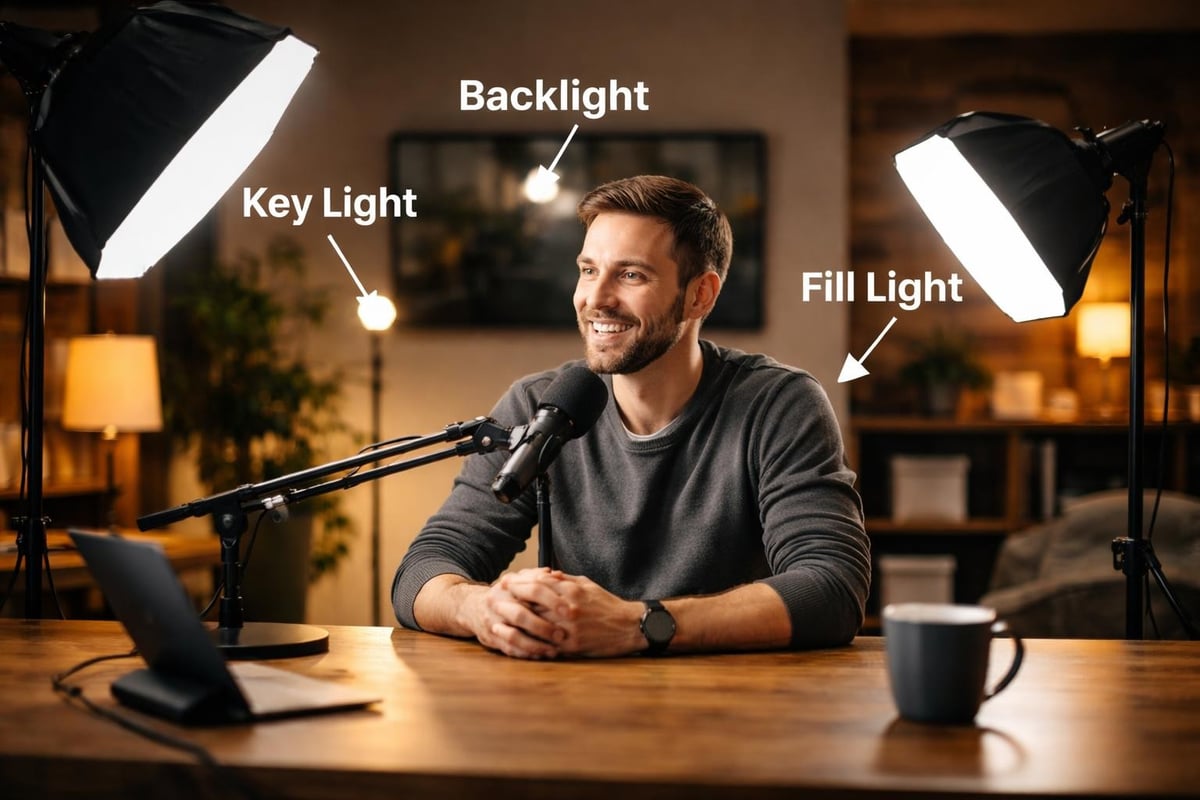
Proper lighting dramatically impacts video quality, often more than camera choice. Three-point lighting remains the standard configuration for professional podcasts.
Key lights provide your primary illumination. LED panels like the Elgato Key Light or Neewer LED panels offer adjustable color temperature and brightness, allowing you to match different recording environments and times of day.
Fill lights soften shadows created by your key light, while backlights separate you from the background, adding depth to your image. Ring lights work well for solo podcasters in smaller spaces, providing flattering, shadow-free illumination.
Natural window light can supplement artificial lighting, though consistency becomes challenging across multiple recording sessions. Blackout curtains help control natural light, ensuring repeatable results regardless of external conditions.
Accessories and Supporting Equipment
Boom Arms and Microphone Stands
Microphone positioning directly affects audio quality. Boom arms attach to your desk, positioning microphones at optimal height and distance while keeping your workspace clear. The Rode PSA1 and Blue Compass represent industry standards, offering smooth movement and secure positioning.
Traditional microphone stands work better for standing presentations or recording away from a desk. Ensure any stand includes a shock mount to isolate your microphone from vibrations and handling noise.
Pop Filters and Windscreens
Plosive sounds (hard "p" and "b" sounds) create distracting pops in recordings. Pop filters, positioned between you and the microphone, diffuse these bursts of air before they reach the microphone capsule.
Foam windscreens slide directly onto microphones, serving a similar purpose while also protecting the microphone from dust and moisture. Many podcasters use both for maximum protection, particularly when recording in untreated spaces.
Cables and Adapters
Quality cables matter more than many beginners realize. Cheap cables introduce noise, connection issues, and signal degradation that undermines expensive microphones and interfaces.
XLR cables should be at least 10 feet long to allow positioning flexibility. Brands like Mogami and Canare provide professional reliability. USB cables connecting interfaces to computers should be USB 3.0 or higher, with lengths under 15 feet to prevent signal loss.
Keep backup cables for every connection type. A failed cable during recording can derail production schedules, particularly when recording time-sensitive interviews with busy guests.
Room Treatment and Acoustic Considerations
Basic Acoustic Treatment
The recording environment significantly impacts audio quality, making basic room treatment essential among equipments needed for a podcast. Hard surfaces reflect sound waves, creating echo and hollow-sounding recordings.
Acoustic foam panels absorb mid to high frequencies, reducing echo and tightening your sound. Strategic placement on walls behind and beside your recording position provides noticeable improvement. Two to four panels often suffice for home podcast studios.
Bass traps address low-frequency buildup in room corners. These thicker acoustic treatments prevent the boomy sound that smaller foam panels cannot control. Placing bass traps in room corners where walls meet ceilings delivers maximum effectiveness.
Portable solutions like the Kaotica Eyeball or sE Electronics Reflexion Filter create mini acoustic environments around your microphone, reducing room reflections without permanent installation. These work particularly well for renters or those recording in shared spaces.
DIY Acoustic Solutions
Professional acoustic treatment can strain budgets. Cost-effective alternatives include heavy curtains, bookshelves filled with books, and moving blankets hung on walls. These materials absorb sound reflections, improving recording quality without significant investment.
Creating a recording "fort" with blankets draped over a frame isolates your microphone from room acoustics. While less aesthetically pleasing than dedicated treatment, this approach delivers functional results for podcasters on tight budgets.
Multi-Host and Guest Equipment Needs
Scaling for Multiple People
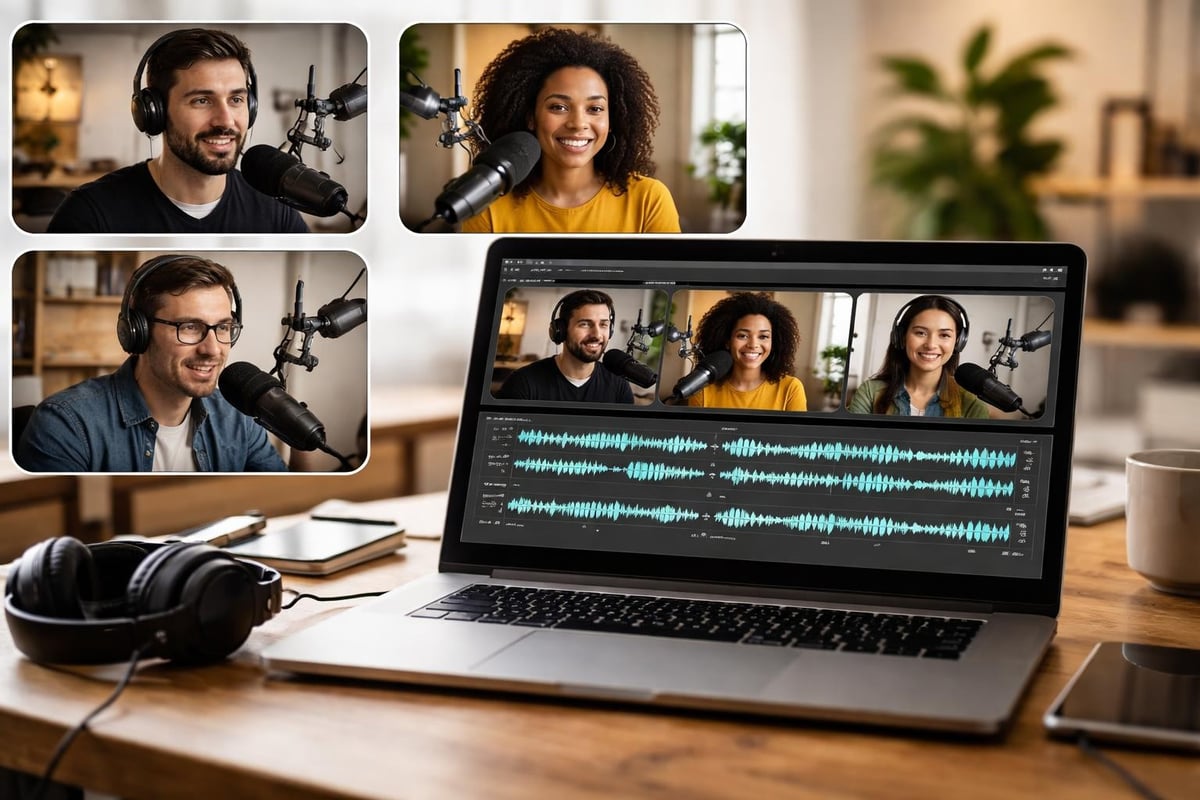
Recording with co-hosts or in-person guests multiplies equipment requirements. Each person needs their own microphone and headphones for optimal results, as detailed in guides about podcast equipment for 2 people.
Your audio interface or mixer must accommodate all microphones simultaneously. The Focusrite Scarlett 4i4 handles two XLR microphones, while the Rodecaster Pro II accommodates four. Larger productions may require multi-channel interfaces like the Behringer UMC404HD or Tascam Model 12.
Headphone distribution becomes critical with multiple participants. Most audio interfaces include one or two headphone outputs. Headphone amplifiers like the Behringer HA400 split one output into four, ensuring everyone monitors the recording simultaneously.
Remote Recording Solutions
Remote interviews require different technical approaches. Services like Riverside.fm, SquadCast, and Zencastr record each participant's audio and video locally, then upload high-quality files to the cloud. This prevents internet connection quality from degrading your recording.
| Platform | Video Quality | Audio Quality | Best Feature |
|---|---|---|---|
| Riverside.fm | Up to 4K | Uncompressed WAV | Local recording reliability |
| SquadCast | 1080p | Studio-quality | Progressive uploads |
| Zencastr | 1080p | Lossless | Automatic post-production |
| StreamYard | 1080p | High-quality MP3 | Multi-streaming capability |
Each guest needs their own microphone and headphones for professional results. Many remote recording platforms work with standard USB microphones, making comprehensive equipment guides valuable resources for preparing guests before recording sessions.
Power Solutions and Backup Systems
Uninterruptible Power Supplies
Power interruptions destroy recordings and potentially damage equipment. Uninterruptible power supplies (UPS) provide battery backup during outages, allowing you to save work and shut down properly.
A UPS rated for 600-900VA protects your computer, audio interface, and external hard drives. This investment prevents data loss and equipment damage from power surges or sudden outages during critical recording sessions.
Backup Recording Methods
Equipment failures happen at the worst possible times. Backup recording systems provide insurance against technical disasters.
Recording directly into your DAW while simultaneously capturing audio on a portable recorder like the Zoom H5 or Tascam DR-40X creates redundancy. If computer issues corrupt your primary recording, the portable recorder provides a complete backup.
Many podcasters also record video conversations through Zoom or other platforms as an additional backup layer, even when using dedicated podcast recording software. This multi-layered approach ensures salvageable content regardless of individual system failures.
Storage and Archival Equipment
External Hard Drives and Cloud Storage
Podcast files consume significant storage space, particularly when working with video content and uncompressed audio. External hard drives provide local storage for active projects and archives.
Solid-state drives (SSDs) offer faster file access than traditional hard drives, reducing editing workflow friction. However, traditional hard disk drives (HDDs) provide more storage capacity per dollar for archival purposes.
Cloud storage services like Google Drive, Dropbox, or Backblaze provide off-site backup protection. Following the 3-2-1 backup rule (three copies of data, on two different media types, with one copy off-site) protects against catastrophic data loss from hardware failures, theft, or disasters.
Monitoring and Quality Control Tools
Audio Meters and Analysis Software
Professional podcasters monitor audio levels constantly during recording. Most DAWs include built-in meters, but dedicated tools provide additional insights.
LUFS meters ensure consistent loudness across episodes, meeting platform specifications for podcast delivery. Plugins like Youlean Loudness Meter or iZotope Insight provide detailed loudness analysis, helping maintain professional standards.
Spectrum analyzers visualize frequency content, identifying problems like low-frequency rumble or harsh high frequencies that escape casual listening. These tools become particularly valuable when optimizing podcast sound for different listening environments and devices.
Budget Considerations and Starter Kits
Entry-Level Setup ($200-$400)
Starting with essential equipments needed for a podcast doesn't require enormous investment. A basic setup includes:
- USB microphone (Audio-Technica ATR2100x-USB): $100
- Headphones (Sony MDR-7506): $100
- Pop filter: $10
- Boom arm: $20-$40
- Free recording software (Audacity or GarageBand): $0
- Basic acoustic treatment (DIY solutions): $20-$50
This configuration delivers acceptable quality for beginners testing podcasting before committing to larger investments. Many successful podcasts started with similar setups, upgrading equipment as audience growth justified additional spending.
Mid-Range Setup ($800-$1,500)
Growing podcasts benefit from improved equipment that enhances production quality without breaking budgets:
- XLR microphone (Shure SM58 or Audio-Technica AT2035): $100-$150
- Audio interface (Focusrite Scarlett 2i2): $180
- Boom arm (Rode PSA1): $100
- Professional headphones (Audio-Technica ATH-M50x): $150
- Acoustic treatment panels: $100-$200
- Adobe Audition subscription: $22/month
- Basic lighting kit for video: $150-$300
- Webcam or entry-level camera: $200-$400
This tier supports professional audio quality and basic video podcasting, as explored in resources about podcast equipment at different budgets.
Professional Setup ($3,000-$7,000+)
Established podcasts and those prioritizing maximum quality invest in professional-grade equipment:
- Premium microphone (Shure SM7B, Electrovoice RE20): $400-$500
- Professional audio interface (Universal Audio Apollo Twin): $900
- Multiple camera setup with DSLR/mirrorless bodies: $1,500-$3,000
- Professional lighting system: $500-$1,000
- Comprehensive acoustic treatment: $500-$1,500
- Digital mixer (Rodecaster Pro II): $700
- Professional monitoring and backup systems: $500-$1,000
Professional setups support studio-quality productions that compete with major media companies. However, exceptional content remains more valuable than expensive gear, and understanding when to invest in professional services can provide better returns than equipment purchases alone.
Specialized Equipment for Specific Formats
Interview Podcasts
Interview-focused shows require equipment for hosting guests comfortably. Additional microphones, headphones, and boom arms accommodate in-person conversations. Some podcasters invest in comfortable seating, small tables for guest beverages, and soundproofing to create professional interview environments.
Hybrid setups combining in-person hosts with remote guests require both local recording equipment and reliable internet connectivity. Backup internet connections (mobile hotspots) prevent technical failures during important interviews.
Narrative and Story-Based Podcasts
Narrative podcasts often require field recording equipment for capturing audio outside studio environments. Portable recorders with built-in microphones, lavalier microphones for interview subjects, and windscreens for outdoor recording become essential.
Sound design for narrative podcasts demands extensive sound effects libraries and advanced editing software. Many narrative producers invest in premium sample libraries and specialized plugins for creating immersive audio experiences.
Live and Audience-Interactive Shows
Live podcasting introduces additional technical complexity. PA systems, additional microphones for audience questions, and streaming equipment for simulcast delivery require careful planning and setup.
Video switchers allow live camera switching between hosts, guests, and audience members. This level of production typically requires dedicated technical operators or sophisticated automation systems.
Maintenance and Longevity
Equipment Care and Protection
Proper maintenance extends equipment lifespan and maintains performance. Microphones should be stored in protective cases when not in use, protecting sensitive components from dust and physical damage.
Regular cleaning prevents buildup that degrades performance. Microphone windscreens should be washed monthly, cables inspected for damage, and electronic components kept in climate-controlled environments avoiding extreme temperatures and humidity.
Upgrading Strategically
Equipment needs evolve as podcasts grow. Strategic upgrades focus on addressing current limitations rather than chasing specifications.
Monitor your production workflow for bottlenecks. If audio quality limits listener growth, upgrade microphones or acoustic treatment. If editing consumes excessive time, invest in better software or consider outsourcing to specialists who provide comprehensive video podcast editing services.
Selling or repurposing replaced equipment offsets upgrade costs. Entry-level gear maintains value in secondary markets, making upgrades more financially feasible than initial purchases.
Integration with Production Workflows
The equipments needed for a podcast must integrate into efficient production workflows. Hardware represents only part of the equation, with software, processes, and systems determining overall effectiveness.
Successful podcasters develop consistent workflows from recording through publishing. Equipment choices should support these workflows rather than complicate them. Simple, reliable gear often outperforms complex systems that introduce friction into creative processes.
Understanding how equipment interacts helps troubleshoot problems quickly. Signal flow knowledge (how audio travels from microphone through interface to computer) enables rapid problem identification when technical issues arise during recording sessions.
Selecting the right equipments needed for a podcast depends on your format, budget, and production goals, but starting with quality core components provides a foundation for growth. While investing in professional gear elevates production value, remember that compelling content always outweighs expensive equipment. If managing the technical aspects of podcast production feels overwhelming, Podcast Monkey handles everything from recording support and audio editing to video optimization and social media repurposing, allowing you to focus on creating exceptional content while we transform your recordings into polished, professional episodes ready for distribution across all platforms.
About Podcast Monkey
Podcast Monkey is a video-first podcast production agency that handles strategy, recording support, editing, YouTube optimization, and repurposed clips for B2B brands. We specialize in turning raw podcast recordings into polished episodes and social content ready for YouTube, podcast platforms, and social media.
To get help with your show, book a free personalized podcast strategy consultation here: https://calendly.com/d/crd7-h33-vmq/personalized-podcast-strategy-consultation