Equipment to Start Podcast: Essential Gear Guide 2026

Starting a podcast in 2026 requires more strategic planning than ever before, especially as video-first content dominates platforms like YouTube and social media. Whether you're launching a B2B interview series or a narrative storytelling show, having the right equipment to start podcast production sets the foundation for professional results. The good news is that you don't need to drain your budget to get started, but understanding which pieces of gear matter most will save you time, money, and countless hours of frustration. This guide breaks down everything you need to know about selecting podcast equipment that matches your goals, budget, and content format.
Understanding Your Podcast Equipment Needs
Before purchasing any gear, you need to define your podcast format and distribution strategy. A solo commentary show recorded in a home office has vastly different requirements than a multi-host interview program filmed for YouTube.
Video-first podcasts demand additional equipment beyond traditional audio setups. If you're planning to publish on YouTube, you'll need cameras, lighting, and potentially more sophisticated audio interfaces to handle multiple inputs. The shift toward video content has transformed what constitutes essential podcasting gear.
Consider these factors when planning your setup:
- Number of hosts and guests: Solo, co-hosted, or interview format
- Recording location: Home studio, office, or mobile recording
- Distribution platforms: Audio-only or video-first strategy
- Content frequency: Weekly, biweekly, or monthly production schedule
- Post-production approach: DIY editing or professional services
Your equipment choices should align with your long-term podcast strategy rather than just immediate needs. Many podcasters start with basic setups and gradually upgrade as their audience grows and revenue increases.
Microphones: The Foundation of Quality Audio
The microphone represents the most critical piece of equipment to start podcast production. No amount of post-production can fully compensate for poor recording quality at the source.
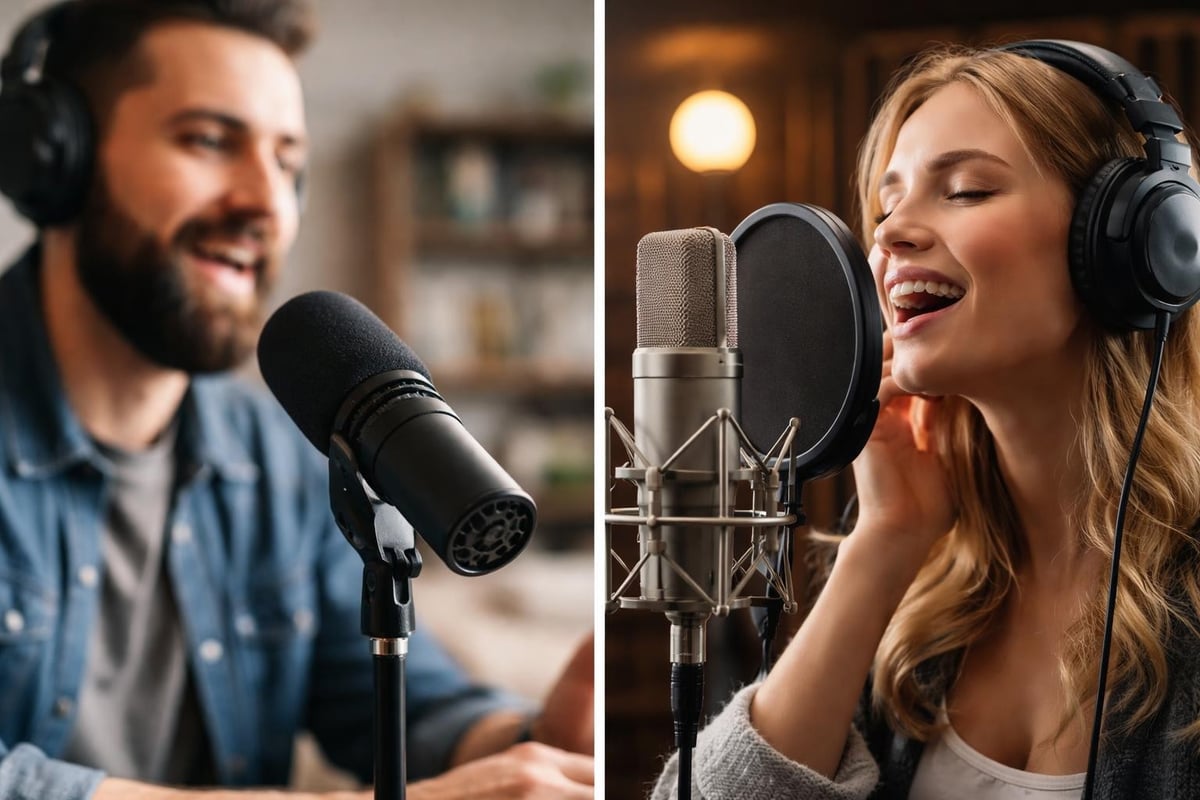
Dynamic vs. Condenser Microphones
Dynamic microphones excel in untreated spaces because they reject background noise effectively. They're ideal for home offices, spare bedrooms, or anywhere without acoustic treatment. Popular models like the Shure SM7B and Audio-Technica ATR2100x-USB deliver broadcast-quality results without requiring thousands of dollars in room treatment.
Condenser microphones capture more detail and nuance but also pick up room reflections, HVAC noise, and keyboard clicks. They work best in acoustically treated environments and typically require phantom power from an audio interface.
| Microphone Type | Best For | Price Range | Power Requirements |
|---|---|---|---|
| USB Dynamic | Beginners, simple setups | $79-$249 | USB powered |
| XLR Dynamic | Growing shows, flexibility | $99-$399 | Interface/mixer required |
| USB Condenser | Treated spaces, voiceover | $129-$299 | USB powered |
| XLR Condenser | Professional studios | $299-$2,000+ | Phantom power required |
Top Microphone Recommendations for 2026
The essential podcast equipment guide has been updated for current market options. Here are the standout choices:
- Shure MV7: Hybrid USB/XLR connectivity offers flexibility as your setup evolves
- Audio-Technica AT2020: Budget-friendly condenser with professional sound quality
- Rode PodMic: Purpose-built for podcasting with excellent voice reproduction
- Electro-Voice RE20: Broadcast standard with minimal proximity effect
For video podcasts, consider microphones with minimal handling noise if you'll be gesturing or moving during recording. The equipment you choose should support both current needs and future growth.
Audio Interfaces and Recording Devices
An audio interface converts analog microphone signals into digital data your computer can process. While USB microphones bypass this requirement, XLR interfaces provide superior flexibility and upgrade paths.
Choosing the Right Interface
Your interface selection depends on how many simultaneous inputs you need. Solo podcasters can work with single-channel interfaces, while interview formats require at least two channels.
Entry-level interfaces ($99-$199) like the Focusrite Scarlett Solo or PreSonus AudioBox provide clean preamps and reliable performance. These work perfectly for solo shows or remote recording where each person records locally.
Mid-tier interfaces ($199-$399) such as the Focusrite Scarlett 2i2 or SSL 2+ offer improved preamp quality and additional features like loopback recording for capturing remote guests through software like Riverside or SquadCast.
Professional podcasters often invest in four-channel interfaces like the Focusrite Scarlett 4i4 or MOTU M4, enabling in-person interviews with multiple guests while maintaining separate audio tracks for editing flexibility.
Headphones for Monitoring and Editing
Quality headphones serve dual purposes in podcast production. During recording, they allow you to monitor audio levels and catch technical issues immediately. In post-production, they reveal details that consumer earbuds miss.
Studio Headphones vs. Consumer Headphones
Studio headphones provide flat, accurate sound reproduction rather than enhanced bass or treble. This accuracy helps you make better editing decisions and ensure your podcast translates well across different playback systems.
Closed-back headphones prevent audio bleed into microphones during recording. Models like the Audio-Technica ATH-M50x or Sony MDR-7506 have become industry standards because they're reliable, comfortable for long sessions, and provide honest sound reproduction.
Key features to prioritize:
- Closed-back design to prevent microphone bleed
- Flat frequency response for accurate monitoring
- Comfortable padding for extended wear
- Replaceable cables and parts for longevity
- Impedance matched to your audio interface
If you're working with a professional podcast editing service, they'll handle the critical listening, but quality headphones still matter for recording monitoring and content review.
Cameras and Lighting for Video Podcasts
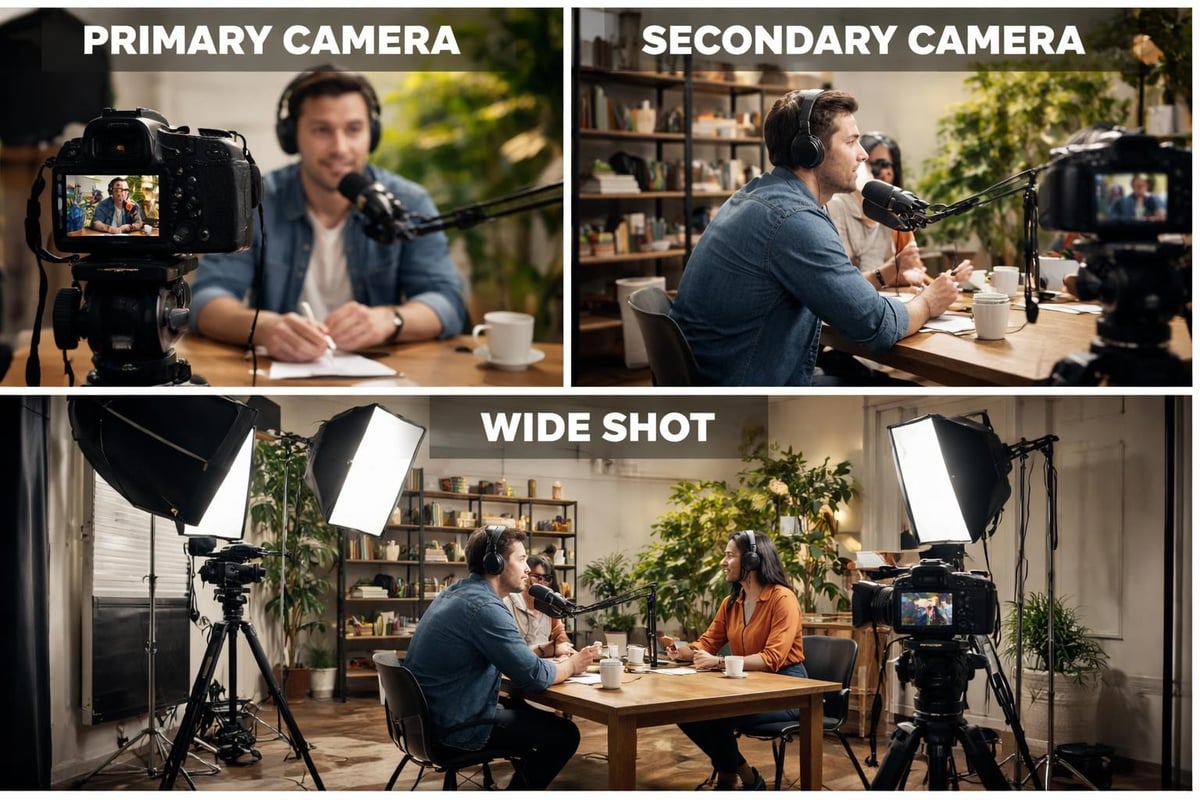
Video content dominates podcast discovery in 2026, making cameras essential equipment to start podcast production for most creators. The best podcasts on YouTube all prioritize video quality alongside audio.
Camera Options Across Budget Levels
You don't need cinema cameras to produce compelling video podcasts. Modern webcams, mirrorless cameras, and even smartphones can deliver professional results with proper lighting and framing.
Webcam setups ($100-$300) work for budget-conscious creators. The Logitech StreamCam or Razer Kiyo Pro provides 1080p quality suitable for talking-head content. These plug-and-play solutions eliminate complex setup but offer limited creative control.
Mirrorless cameras ($500-$2,000) like the Sony ZV-E10 or Canon M50 Mark II deliver cinematic depth of field and superior low-light performance. They require additional accessories like dummy batteries for extended recording and HDMI capture cards to connect to your computer.
| Camera Type | Resolution | Best Use Case | Considerations |
|---|---|---|---|
| Webcam | 1080p | Solo shows, simple setups | Limited manual control |
| Mirrorless | 4K | Professional productions | Requires capture card |
| DSLR | 4K | High-end studios | Recording time limits |
| Smartphone | 4K | Mobile, supplementary angles | Needs mounting solutions |
Lighting Fundamentals
Poor lighting undermines even the best cameras. The equipment to start podcast video production must include basic lighting to ensure your face is visible and professional-looking.
Three-point lighting creates dimensional, flattering illumination. A key light provides primary illumination, a fill light softens shadows, and a backlight separates you from the background. Budget LED panels from Neewer or Elgato start around $60 and provide adjustable color temperature.
Natural window light works excellently for daytime recording but creates consistency challenges for regular production schedules. Dedicated lights ensure repeatable results regardless of time of day or weather conditions.
Recording Software and Digital Tools
Your recording software captures and manages audio and video inputs. Free options like Audacity or GarageBand handle basic recording, while professional solutions offer advanced features that streamline production.
Local Recording Software
Audacity remains the go-to free option for audio-only podcasts. It supports multi-track recording, basic editing, and essential audio processing. The learning curve is gentle, making it ideal for beginners testing podcast concepts before investing in premium tools.
Adobe Audition provides professional-grade tools including spectral editing, batch processing, and advanced noise reduction. The subscription model ($20.99/month as part of Creative Cloud) fits podcasters who also need video editing capabilities through Premiere Pro.
Reaper offers near-professional capabilities at a fraction of Adobe's cost ($60 for personal license). It's highly customizable but requires more technical knowledge to configure optimally.
Remote Recording Platforms
Remote interviews require specialized software that records high-quality audio and video locally on each participant's device, avoiding compression artifacts from internet transmission.
- Riverside.fm: Records 4K video and 48kHz audio locally, uploads after sessions
- SquadCast: Prioritizes audio quality with automatic backup recordings
- Zencastr: Offers free tier for podcasters testing remote recording
- StreamYard: Great for live streaming with recording capabilities
These platforms have become essential equipment to start podcast production in 2026, as remote collaboration enables access to guests worldwide without travel logistics. The comprehensive equipment guide explains how these tools integrate into complete workflows.
Acoustic Treatment and Recording Environments
Your recording space dramatically impacts audio quality. Hard surfaces create reflections that muddy speech clarity, while proper acoustic treatment creates broadcast-quality sound even in spare bedrooms.
Budget-Friendly Acoustic Solutions
You don't need expensive studio foam to improve your recording space. Strategic placement of household items makes substantial differences:
- Bookcases filled with books diffuse sound reflections naturally
- Heavy curtains or moving blankets absorb high-frequency reflections
- Area rugs on hard floors reduce floor reflections
- Closets with hanging clothes create surprisingly effective recording booths
Professional acoustic panels from companies like Auralex or GIK Acoustics provide predictable results but cost $200-$1,000 for adequate treatment. Focus treatment on first reflection points where sound bounces directly from walls to your microphone.
Portable solutions like the Kaotica Eyeball or sE Electronics Reflexion Filter create isolation around your microphone, reducing room reflections without permanent installation. These work well for renters or those recording in shared spaces.
Boom Arms, Shock Mounts, and Accessories
Small accessories significantly impact recording quality and workflow efficiency. A microphone sitting directly on your desk picks up every keyboard click, mouse movement, and table bump.
Essential Accessories
Boom arms position microphones optimally while freeing desk space. The Rode PSA1+ or Blue Compass provide smooth adjustment and cable management. Budget options from Neewer or InnoGear ($20-$40) work adequately for lighter microphones.
Shock mounts isolate microphones from vibrations transmitted through boom arms or mic stands. Most microphones include basic mounts, but upgrading to models like the Rycote InVision or Rode PSM1 reduces handling noise substantially.
Pop filters prevent plosive sounds (P and B sounds) from overwhelming microphones. Nylon screen filters ($10-$20) work perfectly well, though metal mesh options offer easier cleaning and longer lifespan.
Cable Management and Power Solutions
Quality cables prevent signal degradation and electromagnetic interference. Cheap cables pick up electrical noise from nearby devices, creating hums or buzzes in recordings.
- XLR cables should be shielded and 15-25 feet maximum length
- USB cables should meet USB-IF specifications for data integrity
- HDMI cables for cameras need high bandwidth for 4K signals
- Power conditioners protect equipment and reduce electrical interference
Investing in proper cables and power management prevents frustrating technical issues that waste recording time and damage your content quality.
Budget Recommendations by Tier
The equipment to start podcast production varies dramatically based on your budget and ambitions. Here's how to allocate resources effectively across three budget tiers.
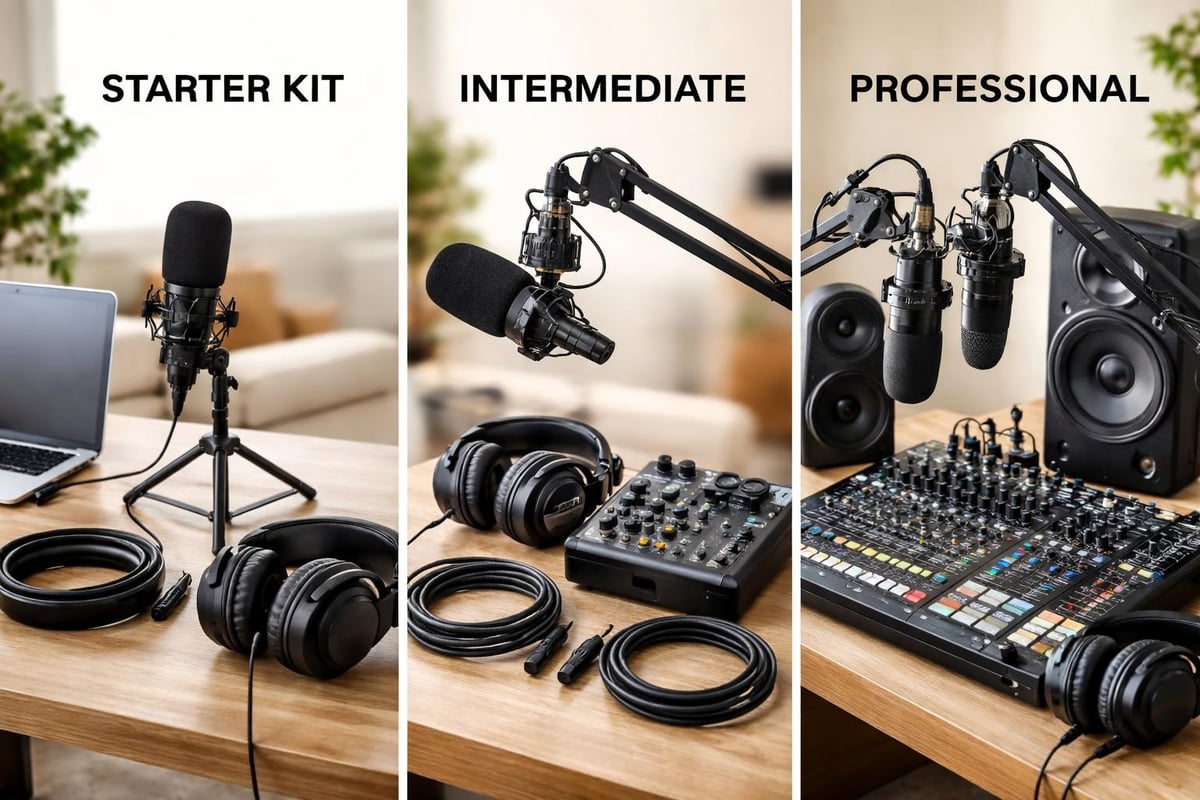
Starter Setup ($200-$500)
This budget gets you recording immediately with room for growth:
- Audio-Technica ATR2100x-USB microphone ($99)
- Audio-Technica ATH-M30x headphones ($69)
- Neewer boom arm with pop filter ($35)
- Acoustic foam panels starter pack ($45)
- Audacity or GarageBand (free)
- Smartphone camera or existing webcam
This setup produces acceptable quality for building an audience. Many successful podcasts started with similar equipment before upgrading as revenue increased. Focus on content quality and consistency rather than gear at this stage.
Intermediate Setup ($500-$1,500)
This tier delivers professional audio quality and acceptable video:
- Shure MV7 hybrid microphone ($249)
- Focusrite Scarlett Solo audio interface ($119)
- Sony MDR-7506 headphones ($99)
- Rode PSA1+ boom arm ($99)
- Logitech StreamCam or Sony ZV-E10 ($400-$700)
- Neewer 2-pack LED lights ($80)
- Adobe Audition or Reaper ($60-$240)
- Basic acoustic treatment ($100)
This setup handles growth from solo shows to guest interviews and produces content competitive with established podcasts. The modular approach means you can upgrade individual components as needs evolve.
Professional Setup ($1,500-$5,000+)
Professional studios invest in reliability, flexibility, and future-proofing:
- Multiple Shure SM7B microphones ($399 each)
- Focusrite Scarlett 4i4 or RødeСaster Pro II ($599)
- Multiple Beyerdynamic DT 770 Pro headphones ($159 each)
- Sony α6400 or Canon R50 mirrorless cameras ($900-$1,200)
- Elgato Key Light Air 2-pack ($260)
- Comprehensive acoustic treatment ($500-$1,500)
- Adobe Creative Cloud subscription ($54.99/month)
At this level, you're equipped to handle any production scenario. However, many professional podcasters outsource editing to services like Podcast Monkey's video editing team rather than investing time in post-production.
Storage and Backup Solutions
Raw podcast files consume substantial storage, especially video content. A single 4K video podcast episode can exceed 100GB before editing. Planning for storage prevents disasters and streamlines workflow.
Local Storage Requirements
Invest in external hard drives or NAS (Network Attached Storage) systems for active projects. Solid-state drives offer speed advantages for editing but cost more per gigabyte than traditional hard drives.
Recommended storage workflow:
- Record to fast SSD for active editing
- Move finished projects to larger HDD for medium-term storage
- Upload final episodes to cloud storage for long-term archival
- Maintain multiple backups following 3-2-1 rule (3 copies, 2 different media, 1 offsite)
Cloud storage services like Dropbox, Google Drive, or dedicated podcast hosting platforms provide offsite backups that protect against hardware failure, theft, or disasters. The best podcast hosting platforms integrate storage with distribution features.
When to Upgrade Your Equipment
Knowing when to upgrade equipment prevents unnecessary spending while ensuring your setup supports your podcast's growth. Not every new product release justifies replacement of working gear.
Upgrade Triggers
Consider upgrading when you experience these situations:
- Your current equipment limits content quality: Background noise overwhelms your microphone or video looks unprofessional compared to competitors
- Format changes require new capabilities: Expanding from solo to interview format or adding video to audio-only shows
- Technical failures interrupt production: Unreliable equipment causes missed episodes or extensive troubleshooting
- Your audience grows significantly: Revenue justifies investment in professional-grade equipment
- Workflow inefficiencies waste time: Outdated software or limited interfaces slow production
Avoid upgrading simply because new products launch. The podcast equipment for beginners that worked six months ago still produces excellent results today. Focus on consistency and content quality rather than chasing the latest gear.
Portable Recording Solutions
Remote interviews, conference coverage, and field recording require portable equipment to start podcast production outside traditional studio settings. Portability involves trade-offs between quality, convenience, and budget.
Portable Recorder Options
Dedicated portable recorders like the Zoom H5 or Tascam DR-40X capture broadcast-quality audio without computers. They're essential for interviews at conferences, on-location segments, or backup recording during technical failures.
Smartphone recording works surprisingly well with proper accessories. The Shure MV88+ or Rode VideoMic Me-L transform phones into capable field recording devices. Combine these with apps like Ferrite or Hindenburg Field Recorder for professional results.
Portable setups should include:
- Compact recorder or smartphone with external microphone
- Lavalier microphones for interview subjects
- Headphones for monitoring
- Extra batteries and memory cards
- Portable acoustic treatment like blankets or foam
These solutions enable content diversity beyond studio-based conversations, opening opportunities for documentary-style storytelling and event coverage that differentiates your podcast.
Software Beyond Recording
The equipment to start podcast production extends beyond hardware to software tools that streamline workflow, enhance quality, and expand distribution reach.
Editing and Post-Production
While professional editing services handle technical work for many successful podcasters, understanding editing software helps you communicate effectively with editors or handle simple tasks yourself.
Descript revolutionized podcast editing by enabling text-based editing. Transcriptions allow you to edit audio by deleting words from text, making the process accessible to non-technical creators. It includes filler word removal, multi-track editing, and video capabilities.
Adobe Premiere Pro handles video podcast editing with industry-standard tools. The learning curve is steep, but capabilities exceed specialized podcast software. Many podcasters working with video editing specialists use Premiere-compatible workflows.
Distribution and Hosting
Podcast hosting platforms store your episodes and generate RSS feeds that distribute content to Apple Podcasts, Spotify, and other directories. These platforms are essential infrastructure, not optional accessories.
Quality hosting platforms provide:
- Unlimited bandwidth to prevent surprise charges
- Detailed analytics showing listener behavior
- Website integration for embedded players
- Distribution to major podcast directories
- Tools for monetization and listener engagement
Popular options like Buzzsprout, Transistor, or Captivate charge $12-$49 monthly depending on upload limits and features. The investment ensures reliable distribution and valuable audience insights.
Testing and Optimizing Your Setup
After acquiring equipment to start podcast production, systematic testing prevents problems during actual recording. Small adjustments during setup save hours of editing frustration.
Audio Testing Protocol
Record test episodes checking for these issues:
- Background noise: HVAC systems, computer fans, street traffic
- Room reflections: Clapping reveals problematic echoes and reverb
- Microphone proximity: Test optimal distance for your voice and equipment
- Level consistency: Ensure peaks stay below -6dB with average around -18dB
- Processing needs: Determine if compression or EQ improves clarity
Video testing should verify:
- Lighting eliminates harsh shadows and provides even illumination
- Camera focus stays sharp during normal movement
- Frame composition follows rule of thirds
- Background remains clean and non-distracting
- Colors appear natural and consistent across cameras
Create recording templates with these optimal settings saved in your software. This ensures consistency across episodes and speeds up your production workflow significantly.
Building vs. Buying Complete Kits
Some manufacturers offer complete podcast kits bundling microphones, headphones, interfaces, and accessories. These packages simplify purchasing but may include components you don't need or wouldn't choose individually.
Complete Kit Advantages
Compatibility assurance eliminates guesswork about whether components work together. Everything arrives ready to connect, reducing setup time and technical troubleshooting.
Cost savings sometimes exist compared to purchasing items separately, though savvy shoppers often find better deals building custom setups during sales events.
Simplified research appeals to beginners overwhelmed by options. One purchase decision replaces dozens of individual product comparisons.
Custom Setup Advantages
Optimized component selection ensures each piece matches your specific needs. Interview-focused podcasters prioritize multi-channel interfaces while solo creators might choose higher-end microphones instead.
Upgrade flexibility allows replacing individual components as needs evolve. Complete kits often include adequate but not exceptional pieces across categories.
Better value comes from selecting components at your chosen price points rather than accepting package compromises.
The podcast equipment recommendations organized by budget help whether you're building custom setups or evaluating complete packages.
Future-Proofing Your Investment
The podcast landscape evolves rapidly. Equipment choices should accommodate foreseeable changes without requiring complete replacement as your show grows.
Flexibility Indicators
Scalable interfaces support adding inputs as you transition from solo to interview formats. Four-channel interfaces cost only slightly more than two-channel models but provide substantial growth room.
Hybrid connectivity like USB/XLR microphones work with simple USB setups initially, then connect to professional interfaces later without replacement.
Modular lighting allows adding fixtures to multi-camera setups rather than replacing complete systems. LED panels with consistent color temperature ensure new lights match existing equipment.
Software subscriptions provide automatic updates including new features and compatibility with evolving formats. One-time purchase software risks obsolescence as operating systems and file formats change.
Consider your podcast's likely evolution over 12-24 months when selecting equipment. The money spent avoiding premature upgrades often justifies slightly higher initial investment in flexible, scalable solutions.
Selecting the right equipment to start podcast production sets the foundation for sustainable, professional content creation. While the options can seem overwhelming, focusing on audio quality first, understanding your specific format needs, and choosing scalable solutions helps you invest wisely at any budget level. Whether you're building a complete studio or starting with minimal gear, the key is beginning with equipment that matches your current reality while supporting your growth trajectory. Once you have your recording setup optimized, partnering with a professional service like Podcast Monkey handles the time-intensive editing, optimization, and distribution tasks, allowing you to focus on creating compelling content that grows your audience.
About Podcast Monkey
Podcast Monkey is a video-first podcast production agency that handles strategy, recording support, editing, YouTube optimization, and repurposed clips for B2B brands. We specialize in turning raw podcast recordings into polished episodes and social content ready for YouTube, podcast platforms, and social media.
To get help with your show, book a free personalized podcast strategy consultation here: https://calendly.com/d/crd7-h33-vmq/personalized-podcast-strategy-consultation